Friday, June 20, 2008

How to open .docx files on a Mac

MS always feels the need to throw its users curve ball with every new release, such as completely changing the interface of MS Office or migrating to an entirely new document format! Thanks Steve Ballmer and Bill Gates.

Here's a bandaid solution for the frustrated, though you'll most likely lose formatting. Best thing to do is download the converter mentioned at the end of mindplunge's post or upgrade to Office 2008 for Mac.

Open .docx files on a mac | mindplunge:

Ever had to open up a docx file on a Mac and you had no idea how to? Here is the simple solution:
  • Change .docx to .zip
  • Unzip it.
  • Go to Safari and File > Open File…
  • Navigate to the /insert_name_of_Word_file_here/word/document.xml and open.
  • Read text.
Update:

Microsoft released a converter for the Mac last December. It’s still in beta but it does the job perfectly.
Download Microsoft Office Open XML File Format Converter for Mac 0.2.1 (Beta) here.

Sunday, June 01, 2008

Apple censors can't stop me

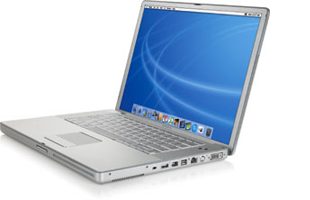
PowerbookConcerning my recent post on the Powerbook G4 lower RAM slot failure issue, I made a post on Apple Discussions that was promptly taken down. So I’ll just post the email I received from the gracious Apple Host (along with my original post) here for all to see:

Apple removed your post on Apple Discussions, titled “Re: logic board died after being replaced 2 years ago,” because it contained the following:

* Discussion of Apple Policies, Procedures or Decisions
* Polls or Petitions
* Non-constructive rants or complaints

We are including a copy of your post at the end of this email for your reference.

Our terms of use, which include helpful information about using Apple Discussions, is located here: http://discussions.apple.com/help.jspa We encourage you to continue using the Apple Discussions while abiding by our terms of use.

Kind regards,

Apple Discussions staff

++++++++++

A copy of your message for reference:


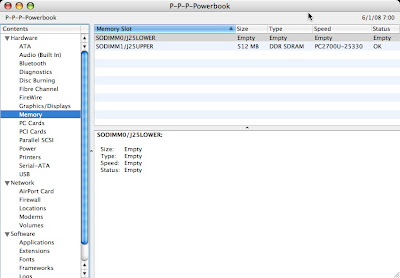
My Powerbook G4 1.5 GHz 15” (1 GB RAM) also recently developed the lower RAM slot failure. Our PB had slowed to a crawl, so I popped open System Profiler and noticed that half my RAM was missing (lower slot showed EMPTY). I thought it was the memory, so I bought another stick and tried it in both slots—the lower slot continued to show EMPTY, while the upper slot was OK.

My problem is that my PB’s serial number DOES NOT FALL within the arbitrary range selected by Apple for the Repair Extension Program. I spent an hour yesterday on the phone with Apple Tech Support, and they want me to take it to the Apple Store here in San Antonio to be checked out. Of course, they will discover (like me) that the lower slot is bad, and then they will tell me what the person at Apple told me on the phone—I’ll HAVE TO PAY TO FIX IT BECAUSE IT’S NOT IN THE SERIAL NUMBER RANGE SELECTED BY APPLE FOR THE REPAIR EXTENSION PROGRAM

I have found many examples via Google of Apple customers in my exact predicament—lower slot failure with Powerbooks outside of that serial number range. Seems to me that Apple has a bigger problem than they want to admit, so let the class actions begin. One way or another, Apple will have to own up to this considerable problem.

Recommend others searching here and having my problem snoop around via Google and sign the petition and the class action that’s being started.

Powerbook lower RAM slot failure

PowerbookApple doesn't do it often, but when they piss off their customers--they REALLY piss off their customers. We recently noticed that our Powerbook G4 15" 1.5 GHz (purchased mid-2004) was slowing down. Being dense, it took me a while to open System Profiler and notice that half of our memory was gone (from the original 1 GB down to 512 MB). The memory in the lower slot was listed as "EMPTY."

My problem is that my PB's serial number DOES NOT FALL within the arbitrary range selected by Apple for the PowerBook G4 (15-inch 1.67/1.5GHz) Memory Slot Repair Extension Program. I spent an hour yesterday on the phone with Apple Tech Support, and they want me to take it to the Apple Store here in San Antonio to be checked out. Of course, they will discover (like I did) that the lower slot is bad, and then they will tell me what the person at Apple told me on the phone:

I'LL HAVE TO PAY TO FIX IT BECAUSE IT'S NOT IN THE SERIAL NUMBER RANGE SELECTED BY APPLE FOR THE REPAIR EXTENSION PROGRAM.

And I'm not the only one. Others with Powerbooks outside of Apple's arbitrarily chosen serial number range are also plagued with this problem:

RAM slot not working after upgrading to Leopard | MacRumors Forums

I was not aware of this problem, however my serial number is outside the range of "affected" machines. It does exactly describe my problem, though. And perhaps it has nothing to do with Leopard but like I said, it happened just after I installed it. I suppose I can live on 1GB of RAM, but 1.5 would definitely help.

Thanks for your replies,
Matt

PowerBook G4: Memory Problems | Macintouch

I have a 1.33 Ghz 15" Powerbook and the lower memory slot has died in my machine - twice. Both times Apple (under Applecare) replaced the motherboard, but the problem clearly predates the newer machines, and I'm a little anxious about what happens once my expensive Applecare coverage lapses. I suspect that Apple is being disingenuous about the extent of this issue.

Apple - Support - Discussions - logic board died after being replaced 2 years ago:

My PB's logic board is broken again. It was fixed under warranty two years ago.

I was having problems with it, it was running extremely slow and the battery no longer charges. Turns out I am missing half of my RAM. The lower slot no longer sees the RAM, which is what happened two years ago when my logic board died.

My computer is not under warranty anymore (no AppleCare). What should I do? Has this happened to you?

This is just a small sampling of what's out there. Other key links to check out regarding this considerable problem:

Lower Memory Missing; All Forces

Allegations of 15" PowerBook RAM Slot Defect

G4 Powerbook Aluminum RAM slot repair

(if you're not willing to wait for this to play out legally - $250 repair)

Mac OS X updates disable or damage PowerBooks?

PowerBook Logic Board Failure

Powerbook Ram Slot Failure

PowerBook - PB G4 Memory Slot Failure

My cheaper, temporary solution will be to buy a 1 GB stick (yet more expense to me--thanks Apple) to insert in the one good slot; at least I'll have my original amount of RAM again. If you're one of those who had more than 1 GB RAM, you'll have to wait or pay for the repair above--don't send it to Apple (too expensive and too little warranty).

There's a petition out there to sign (4701 signatures as of June 2008), and you can also sign up here for a potential class action lawsuit. Don't get stuck paying for something that's not your fault!

Shame Apple! Look at me--devoted Apple fanboy since 1986--having to beg Apple to treat me like a loyal customer. Shame, shame, shame!

Sunday, May 11, 2008

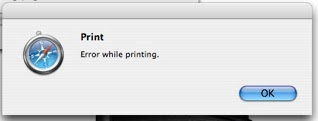
Safari 3.1.1. - "Error while printing"

Here's a weird one. Under one account on my Powerbook, I suddenly can no longer print from Safari (3.1.1.) via Bonjour (i.e., a shared printer on another Mac). Other applications work fine, and other accounts can print from Safari.

Console consistently looked like this:

2008-05-11 10:22:09.602 Safari[1609] PMSessionValidatePrintSettings failed (error code = -50)
2008-05-11 10:22:09.672 Safari[1609] PMSessionEndDocumentNoDialog failed (error code = -30871)
2008-05-11 10:22:11.243 Safari[1609] Failed to end PMPrintContext

Here are the solutions I tried that were ineffective:

The culprit?

Little Snitch...it had been accidentally set to block Safari connections.

Sunday, May 04, 2008

Safari 3.x and PithHelmet

First, if you can't even install PithHelmet (because your Safari isn't recognized), use Pacifist to get the PithHelmet.bundle onto your desktop. It's a SIMBL plug, so make the following directory (if not already there) and place this plugin within it:

/Library/Application Support/SIMBL/Plugins/PithHelmet.bundle

If you're using a newer Safari with an older OS (Tiger), here's how to use PithHelmet:

  • In Safari, select File>About Safari.
  • Note the version/build number in parentheses, i.e., (4525.18).
  • Quit Safari.
  • Navigate to /Library/Application Support/SIMBL/Plugins/PithHelmet.bundle.
  • Control click to show package contents.
  • Open bundle and go to Contents.
  • Double click or open info.plist in your favorite text editor.hange MaxBundleVersion to the current Safari version. This is to match the current Safari version/build.

It will then look like this:

<key>MaxBundleVersion</key>

<string>4525.18</string>

Save and relaunch Safari.

Original instructions: Mind Mining Medium; Safari 3.1 and Pith Helmet

Sunday, April 20, 2008

Can't open trash? Try this...

If you click on the Trash icon in the Dock and nothing happens, try quitting the Finder and restarting it.

Vista 'a work in progress'

A work in progress? You mean M$ releases unfinished products on its customers? Yes...products that they can't completely fabricate will take some time before they can, so use this garbage until the REAL Vista is ready.

Ballmer: Vista 'a work in progress' - Business - Macworld UK:

As users clamour for Microsoft to continue to support Windows XP, company CEO Steve Ballmer called the Vista OS "a work in progress" at an annual Seattle event on Thursday.

"It's a very important piece of work. We did a lot of things right and have a lot of things we need to learn from. You never want to let five years go between releases," he said.

Saturday, February 09, 2008

Yahoo to tell Microsoft to shove it

Insert laugh of Nelson Muntz from The Simpsons.

Yahoo to reject Microsoft bid: source - Yahoo! News:

NEW YORK (Reuters) - Yahoo Inc. is set to reject Microsoft Corp.'s offer, initially worth $44.6 billion, as undervaluing the business, a source familiar with the situation said on Saturday.

The Internet media giant is expected to reject Microsoft's offer on Monday, the source said.

Tuesday, February 05, 2008

Microsoft Doubletalk

A buddy named Derek pointed me to these links; they're perfect for the blog. Thanks Derek!

Phil Factor's Phrenetic Phoughts : Microsoft Boy announces his School Homework

Microsoft can't speak straight any more - Joel on Software:

Here's how Microsoft says, “SQL Server 2008 will be late:”

“We want to provide clarification on the roadmap for SQL Server 2008. Over the coming months, customers and partners can look forward to significant product milestones for SQL Server. Microsoft is excited to deliver a feature complete CTP during the Heroes Happen Here launch wave and a release candidate (RC) in Q2 calendar year 2008, with final Release to manufacturing (RTM) of SQL Server 2008 expected in Q3. Our goal is to deliver the highest quality product possible and we simply want to use the time to meet the high bar that you, our customers, expect.”

Tuesday, January 01, 2008

Mac OS X a growing target amongst hackers

I'm trying to remember how many times I've seen this same article over the past two years. It's obvious people at InfoWorld don't know much about Macs. First, the only way that hackers will exploit a Mac is if the Mac user is an idiot, and most Mac users are NOT idiots (most of the intellectual world uses a Mac). Second, IT departments that run Macs (like the U of Mich) run Radmind, which definitely ALLOWS AN IT DEPARTMENT TO UPDATE SEVERAL MACS AT ONCE.
The PC world just can't stop the Mac hatred...so they're trying to plant the myth that Macs are now at risk. Yes...they've always been at risk (like any system), but I still say that any UNIX-based system is far more secure than Windows.

read more | digg story

Fix some Mac slowdowns

Macworldlogo

Here are some good tips for fixing slowdowns on your Mac.

Macworld | Fix Mac slowdowns

I especially like the advice given for web browsing and using Mail:

Quit and Relaunch Web browsers tend to be resource hogs, and if you visit lots of media-rich sites, this effect can increase over time. Quit and relaunch your browser occasionally (at least once a day) to speed up browsing and reduce your browser’s impact on other programs.

Over time, though, these databases can become cluttered or even corrupted, resulting in slower overall performance, among other problems. You may be able to speed up your e-mail client significantly by rebuilding the message index every few months.

Mail’s Rebuild command (Mailbox: Rebuild) works only on individual mailboxes.

Shutting down with the newer keyboards

Losing my old Kensington keyboard means losing my power button. But even though I can't power up from the keyboard anymore, I can still shutdown or restart easily:

Apple - Support - Discussions - The ole keyboard shutdown ...:

Hit CTRL (yes, CTRL, not CMD) and EJECT key. This will bring up 'Are you sure you want to shut down.... dialogue box. Once in there, hit enter/return for shut down or hit 'S' to sleep.

And to bypass the dialog:

Apple - Support - Discussions - Power up from keyboard. ...:

Sleep = opt + cmd + eject
Restart = ctrl + cmd + eject
Shut Down = ctrl + opt + cmd + eject

Monday, December 31, 2007

New Apple Keyboard!

Well, this New Year's Eve, I stupidly spilled coffee into my old Kensington keyboard, while typing away over at GtrOblq. Even though I took it apart and used a hair dryer on it, the bottom row of keys refused to come back to life. So, we did a mad dash to the nearest Best Buy before they closed for New Year's Eve, and I purchased one of those slender, new Apple keyboards. We didn't have time to make it to the Apple Store at La Cantera, because everything closed at 6 pm.

Man, what a great keyboard! I barely feel like I'm typing, and it's so thin that I don't even need a wrist support! Yeah! The front housing is made of Aluminum, so it seems sturdy. I looked at the other Mac-compatible keyboards, but they all came with a mouse and were at least $20 more than the Apple keyboard! So much for that theory that Apple is more expensive.

Wired 2 20070807Wired 1 20070813

Sunday, December 30, 2007

Happy New Year

I've revamped the blog a little. Added some additional sidebar content. Also, be sure to sniff around at my other pages around the web, including:

http://www.sonicdeviant.com
http://sonicdeviant.blogspot.com

Have a great 2008!

Saturday, December 01, 2007

Ballmer, MS, and their cronies at their stupidity again

I really need to write about something else. This blog is turning into a "I hate Microsoft" column. But they're just so hateable.

The iPhone whining from Microsoft is apparently ceaseless. Too bad the iPhone WAS A SUCCESS, eh Ballmer and Allard?

MacNN | MS Zune chief: iPhone is a "lousy" iPod:

"It’s a lousy iPod," Allard explains. "You can’t skip a track without looking at it. You can’t go running with the thing."

Ballmer bawls out Apple iPhone as 'no hoper':

Microsoft's boss Steve Ballmer slammed the iPhone last week, saying it has "no hope" of gaining a foothold in the mobile phone market.

Ballmer clearly hasn't heard much about the one million AT&T customers in the US already signed-up for information on the new product when it ships.

On the security-and-utter-bull-crap front, Computerworld magazine published this gem from a hacking contest winner. Obviously, MS is trying their damnedest to reverse the PR image that their pathetic OSX-wannabe is not the malware slut it once was:

Vista more secure than Mac OS:

I have found the code quality, at least in terms of security, to be much better overall in Vista than Mac OS X 10.4. It is obvious from observing affected components in security patches that Microsoft’s Security Development Lifecycle (SDL) has resulted in fewer vulnerabilities in newly-written code. I hope that more software vendors follow their lead in developing proactive software security development methodologies.

It wasn't all bad, though, in that he actually had some good security advice for Macites:

I recommend that Mac users make their primary user a non-admin account, use a separate keychain for important passwords, and store sensitive documents in a separate encrypted disk image. I think these are fairly straightforward steps that many users can take to better protect their sensitive information on their computer.

Mmm hmm...oh yeah, it's real secure (and energy-friendly). Later we read:

Vista Battery Problems and Microsoft Security Update:

A Domain Name System (DNS) zero-day bug had been found that could expose vulnerabilities throughout Microsoft's entire server line. There are indications that Microsoft will also include a DNS patch in the Tuesday round.

Yep, it's just plain more secure than OS X. We then read this:

How Internet Criminals Will Evade Vista's Safeguards:

Think malware will fade away with Vista? Sorry. There's about as much chance of the thriving throngs of online criminals packing up shop as there is of Microsoft doing the same.

And MS's gobble-everything-up mentality hasn't gone away, seeing that they are unable to muster any innovations of their own accord; when someone is actually competing with them, they'll just work at acquiring a service or product that they just can't seem to deliver well on their own:

Reports: Microsoft pursuing Yahoo:

Microsoft is feeling increasing pressure to compete with Google, which plans to beef up its portfolio with a $3.1 billion purchase of online advertising company DoubleClick Inc. Microsoft currently trails both Yahoo and Google in the lucrative and growing business of Web search, even as Google increases its development of Web-based software that directly competes with Microsoft's lucrative Office suite.


Technorati Tags:
, , , , , , , , , ,

More reasons why Vista is bombing

XP continues to outperform Vista (aka poor copy of OS X).

Testers see Windows XP passing Vista - Yahoo! News:

Wellington, Fla.-based Devil Mountain Software ran several versions of XP and Vista through a test simulating common desktop computing tasks. It found the original Vista performed 50 percent to 100 percent slower than the prevalent XP Service Pack 2, or SP2.

Vista has shaken IT professionals; more and more are considering the "real thing".

Vista woes lead IT pros to Mac, Linux - Business - Macworld UK:

Users won't be booting up Vista PCs any time soon, according to a recent survey, which revealed a majority of IT professionals are worried that migrating to Vista will reduce stability and introduce too much complexity into their environments.
In terms of alternatives, Apple's Mac OS X leads the pack, with support from 28 per cent of survey respondents. About 25 per cent said they would opt for Red Hat Linux, with SUSE Linux and Ubuntu each garnering 18 per cent of the vote. Another nine per cent cited other Linux operating systems and four per cent were unsure.

It turns out that even Microsoft execs can't keep straight which version of their new OSX-lookalike OS will run on which new PCs. Just 'cause your hardware says "Vista Capable" doesn't mean it will work with the Vista that you bought.

Lawyers: even Microsoft confused over Vista marketing - Business - Macworld UK:

Actually, the Vista Capable sticker meant that the machine would not necessarily be able to run any version of Vista, but only a version. A Vista Capable machine, for example, might be able to run Vista Home Basic, the lowest-priced and least-capable version in the lineup, but not the more advanced Home Premium. (Systems also tagged with the Premium Ready sticker, however, would be able to run all versions of the operating system, including the top-end versions such as Ultimate or Home Premium.)

Mac your PC? And they hate us "fanboys"?

More proof that all PC users secretly want to be Mac users, no matter how hard they come down on us "fanboys":

Mock OS X: Five ways to make your PC more like a Mac - Crave at CNET.co.uk:

Oh, and before anybody throws their Start menu out of the pram, the best way to have Mac functions is obviously to buy a Mac. But it's not that simple for roughly 90 per cent of the working population, chained to ancient HP WageSlave 486s in strip-lit spreadsheet farms across the world. For them, this article is a ray of hope. And we're sure there are plenty of people out there who are perfectly happy with Windows, but even they could benefit from the nifty features we have lined up.

Windows apps on a Mac (sans Windows)

Here's another potential Microsoft killer (I hope this is making them shake in their Redmond boots in the same way they gasp at OS X, the iPod, and iPhone):

Uncovered: Evidence that Mac OS X could run Windows apps soon

Leopard apparently contains an undocumented loader for Portable Executables, a type of file used in 32-bit and 64-bit versions of Windows. More poking around revealed that Leopard's own loader tries to find Windows DLL files when attempting to load a Windows binary.

PC User Compares Leopard to Vista

Leopard is the New Vista, and It's Pissing Me Off:

Pcm 15 Header Surprise, surprise! A PC Magazine columnist, who claims to worship OS X 10.4 (Tiger), is more or less calling Leopard OS X 10.5 unfit for release in much the same way Vista was unfit (and is still unadopted by the PC faithful).

Let's break this idiot's diatribe apart piece-by-piece, shall we?

Let's see, Tiger crashed—oh yeah, NEVER. Ten months and I'm installing everything from production-level Office for the Mac 2004 to 0.x releases of VLC, Seashore, and Ecto—even betas of Firefox and Parallels. Whatever my nerdy little heart desires. I've had those early apps crash, but Tiger never faltered.
First of all, BS! All OS's crash, though I proclaim that OS X is typically more stable than Windows, regardless of the version. I guarantee you that Tiger version 10.4.0 crashed MORE than version 10.4.5, and so on. Now the latest version of Tiger (10.4.11) has some quirks that tick me off in a few included apps (like making me use Safari 3.x, for example), but what we're seeing here from this guy is a little overstated.

The first version of anything is going to have bugs. All developers rely on the cutting-edge crowd to find the junk in their code that they have been unable to find. Basically, if you buy and install the first version of anything, you're paying to be a beta tester, whether you like it or not!

Later on, the goon states:

A month of using Leopard with the same software I had under Tiger and the OS has dumped six times. That's six cold reboots for Oliver. Apple isn't even honest enough to admit that Leopard is crashing: The OS just grays out my desktop and pops up a dialog box telling me I've got to reboot. Like the whole thing is my fault. I even snapped a picture of it. After all, I HAD PLENTY OF CHANCES! And all my complaints, mirrored by online forum traffic, are the same complaints I heard about Vista when it first reared its unbaked head.
Next lesson for this noob. Developers of software for a particular OS MUST CATCH UP WITH THE LATEST OS RELEASE! If they don't, IT'S NOT APPLE'S FAULT! Hello, are you listening, Oliver? Every time I've upgraded to a new version of OS X, apps that once worked on the previous version have occasionally had problems. I either must wait until the developer fixes the app to work with the new OS version, or I MUST CHOOSE NOT TO UPGRADE UNTIL ALL THE APPS I USE ARE COMPATIBLE. These are all simple, elementary things that every savvy computer user knows. PC Mag...I'm available if you need a writer with a brain who uses a Mac.

Saturday, October 06, 2007

Microsoft bullcrap of the month

Microsoft Excel fails math test - Yahoo! News:

In a blog pst, Microsoft employee David Gainer said that when computer users tried to get Excel 2007 to multiply some pairs of numbers and the result was 65,535, Excel would incorrectly display 100,000 as the answer.

Gainer said Excel makes mistakes multiplying 77.1 by 850, 10.2 by 6,425 and 20.4 by 3,212.5, but the program appears to be able to handle 16,383.75 times 4.

“Further testing showed a similar phenomenon with 65,536 as well,” Gainer wrote Tuesday.

He said Excel was actually performing the calculations correctly, but when it comes time to show the answer on the screen, it messes up.
Remember this? Steve Ballmer said the iPhone would be a failure. Obviously, he's a genius...because it sure has been a big failure, LOL! Now, we can see the Zune looking more and more like the iPod:
Microsoft is upgrading its Zune line and testing a website where owners of the MP3 players can socialize as the technology giant strives to wrest market share from Apple's beloved iPods.

Sunday, September 30, 2007

Adobe makes me mad: disable Adobe plugin

When installing Adobe Reader on your Mac, you also inadvertently install the plugin inside Safari that takes forever to open a pdf. To get rid of it, just delete their damn plugin at:

/Library/Internet Plug-Ins/AdobePDFViewer.plugin

MCLD blog: How to disable Adobe Reader Safari plugin

Saturday, September 22, 2007

Ringtones in iTunes--no longer free?

So, it looks like a new cat-and-mouse game has erupted between Apple (trying to gouge folks for another dollar) and savvy users who want to load their iPhone with ringtone music they already own. This is quite similar to the DRM wars, where users have continued trying to remove the protections from AAC files they have purchased from iTunes.

How to sync ringtones for free under iTunes 7.4.1 – iPhone Atlas:

Apple’s release of iTunes 7.4.1 put an end to the free transfer of current AAC tracks as ringtones to the iPhone — for a day or so at least.

Of course, other tricks continue to work for adding ringtones to cellphones using Bluetooth, like the Motorola RAZR v3, especially using music from your CD collection or other mp3s.

Saturday, August 18, 2007

Mac soars and Vista bores!

Looks like Vista is having trouble managing traction among the faithful:

MacNN | PC Mag chief editor tires of Windows Vista

"The upshot is that even after nine months, Vista just ain't cutting it. I definitely gave Microsoft too much of a free pass on this operating system: I expected it to get the kinks worked out more quickly. Boy, was I fooled! If Microsoft can't get Vista working, I might just do the unthinkable: I might move to Linux."

Of course, notice how he's not willing to give in to the Mac just yet; the Apple-haters just can't let it go--they refuse to allow themselves to be seduced.

Meanwhile, the Mac, in all its beauty and elegance, continues to win over many MS-deluded sheep, even those that find small complaints in the Apple way of doing things:

Review: New iMac tempts a Windows user - Yahoo! News

The iMac deserves to be a strong contender for any PC user looking to get a new computer. If I was looking to replace my PC right now, I would be sorely tempted. Even the Windows software I've accumulated over the years isn't a real reason not to switch, because Macs can now run Windows, too (with some additional software purchases).

Saturday, July 21, 2007

"Well Known" TCP and UDP ports used by Apple

"Well Known" TCP and UDP ports used by Apple software products:

It's a good idea to know what's coming in and going out of your computer. Here is a handy list of ports and protocols that Apple software uses, just to keep you from freaking out when you see all sorts of weird connections on your log. Also, if your firewall is blocking this stuff and you're missing features (like Bonjour recognizing other Macs, you need to unblock the appropriate ports for your network.


Saturday, July 07, 2007

"File type not supported" iPod syncing errors

Apple - Support - Discussions - File type not supported

A bizarre problem recently popped up after I had updated to iTunes 7.2. Suddenly, certain songs would no longer sync with the iPod, even though I had ripped them from my own CDs. These weren't iTMS purchases. And there were only 4 mp3s out of a library of nearly 4K songs that wouldn't sync over anymore.

The solution was simple (but stupid on Apple's part):

In iTunes, drag the songs to the desktop.
Then delete them from iTunes.
Re-add the files back in to iTunes.

No clue why this happened.

Saturday, April 14, 2007

Vista full of "Craplets" | Apple takes advantage

I guess PCs come with a lot of preinstalled "crapware" these days. It's crapware because it's crippled tease software that must be purchased to unlock the full capabilities of the software. Here's another reason why PCs just plain suck...they basically suck your will to live in more ways than one.

MacNN | "Craplets" may affect Vista experience:

Microsoft is worried that unwanted software bundles could affect the success of Windows Vista, according to a senior Microsoft executive.

Apple has taken full advantage with a new ad:

http://www.apple.com/getamac/


Saturday, April 07, 2007

Is Vista a bomb or a hit???

Depending on which media outlet you believe, Vista is either doing poorly or doing so well that it's hurting OS X sales:

MacNN | Vista awareness doing little for sales:

"Vista promised better performance, reliability, security, and a revolutionary user interface - but it appears consumers looking to upgrade are not ready to buy into the promise," said Harris VP Milton Ellis.

Macworld: News: Vista taking a nibble out of Apple in OS wars?:

Windows Vista more than doubled its market share in March from the prior month, while the share of computers running Mac OS X fell for the first time in nine months, according to statistics released Thursday by market research firm Net Applications. [original source: Computerworld]

I think that CW is primarily a PC-related outlet, so maybe they have an axe to grind against Apple. No matter what, MS is still following Apple's lead in every way. So for a company that's falling further behind MS, Apple sure is dictating how the market goes:

Microsoft changes tune on selling DRM-free songs - Yahoo! News:

Following digital music pioneer Apple's lead yet again, Microsoft said this week it will soon sell digital music online without DRM (digital rights management) protection.

Sunday, April 01, 2007

MS always just responding to Apple

MacNN | MS aims at iPhone-like browsing:

Microsoft today issued a response to the iPhone's mobile version of Safari with Deepfish, the codename for a new technology designed for Windows Mobile 5 or 6 smartphones to provide a more desktop-like web browser experience.

Here we go again. MS thinks Apple's iPhone is a mistake, but yet we see this move???

And just the other day, MS was bragging about how much safer Vista is than OS X and other UNIX-flavored OSes. Now, we see this:

Microsoft Investigating Windows Zero-Day Bug - Yahoo! News:

Microsoft Corp. has confirmed a new Windows zero-day bug that is already being targeted by attackers.

And this:

Microsoft: Attacks on Windows flaw rise - Yahoo! News:

SEATTLE - Hackers stepped up attacks Friday on computers running some versions of Windows, a day after Microsoft disclosed a hole related to the mouse cursor. Microsoft Corp. sent out a security advisory Thursday warning customers that a vulnerability in ".ani" files — used to change the cursor into an hourglass while a program works, or into a dancing animal or other animation on specially designed Web sites — was allowing hackers to break into computers and install malicious software.

The folks at MS are either really stupid or really bad liars. Or both...


Sunday, March 25, 2007

Redmond logic: Vista more secure than OS X!

Redmond logic: Vista more secure than OS X - Mac software - Macworld UK:

A Microsoft executive this week claimed Windows Vista's first 90 days was a huge security success when compared to the opening three months of Windows XP, the current Apple Mac OS X, and three flavours of Linux.

Right...and monkeys might fly out of my butt too.


Thursday, March 22, 2007

So long dot Mac!

Well, I'm outta here! It was a $99 payment one year ago to Apple that established me as a .Mac member; it had lots of promise: it was going to sync everything perfectly--no more clutter. It was to be my online portal to the world, hosting websites, pictures, movies. etc. It didn't live up to the hype, however. I had a bunch of problems initially.

And for less than the same price, I just bought a web hosting plan that gives me 400 GB of storage, 8 domains, 3 domain names, 2500 GB of monthly transfer, mega-email accounts, etc., etc., which so far is very fast at web hosting compared to .Mac:

ixwebhosting!

That same $100 bought me a whopping, underwhelming, and pathetic 1 GB of annual storage with .Mac with a max transfer of 10 GB/month, and that includes your email account! Google's Gmail gives you 2 GB for free, and many other online outfits are just as generous!

With Apple, you're paying for the brand; it's a lot like buying a Rolls-Royce over a pick-up truck. And I'm the first to tout Apple's products, because I love almost everything they've dreamed up. However, .Mac is sick and needs to die; I can't believe it's still alive. They're going to need to overhaul it if they want it to hang around, but I suppose there are some users out there not willing to dig deeper to save money.

One redeeming .Mac feature (that wouldn't work for me initially) is the syncing of all your data between two or more Macs. There are ways around this if you're careful; Apple even gives some clues here on how you can do it.

And a $50 commercial app called SyncTogether does most of what .Mac syncing can do, except for keychains (you'll have to be careful and do these manually).

It's been real, and it's been fun...but it has sucked!


Sunday, March 18, 2007

Microshaft = Xerxes (The REAL battle of 300!)


300Poster3The rantings of Clinton Forbes:

Today a former Microsoft employee, a very disgruntled former employee, revealed to Wired Magazine why the company encountered such a large number of problems delivering their latest operating-system release - Apple Computer was to blame.

And later on, the disgruntled MS employee stated:

Gates employed an 'industry research' firm, a company specializing in corporate espionage, to steal the source code of Apple's work-in-progress, OS X version 10.2. He planned to beat Apple to market with Apple's own new features. It was a very strange plan considering that Microsoft already owned over 90% of the desktop market.

How ironic! MS stealing ideas (even code) from Apple?? No way! Not MS! But wait, there's more!

Macworld: News: Ballmer questions business strategy of Google:

Microsoft CEO Steve Ballmer criticized rival Google, saying it is devoted primarily to ad-supported search while Microsoft has reinvented itself many times over.

So here we have that dolt Ballmer publicly putting down other companies, like Apple and Google, that are kicking his company's butt at certain aspects within the tech industry. No surprise there. But, just as Ballmer does this (as one might expect), he's conspiring to destroy the competition through bribery. I guess MS hasn't learned that its Mafioso tactics aren't very sublte:


Microsoft promises rewards for search engine use - Yahoo! News:

In a move intended to wrest users from rival search engines such as market-dominating Google, Microsoft will give business customers service or training credits based on how much employees use Live Search.

Well, dumpy ol' Ballmer and Gates have a reason to worry. They will NOT wrestle control away from Google (nor Apple), because they're only capable of copying and stealing the technology invented by others. Here's an example of how they're losing the battle:

US university dumps Windows to go all Mac - Mac - Macworld UK:

Wilkes University announced on Wednesday that it has pulled the plug on PCs in favour of Macs, saying the move - which actually began last year - will save the Pennsylvania liberal arts college more than $150,000 while letting students and faculty continue to run Windows applications.

So, I think companies like Apple and Google are playing the part of the Spartans and King Leonidas to Microsoft's Xerxes of Persia. The 300 Spartans stood up to Xerxes at Thermopylae and eventually lost, after taking a lot of Persians with them. But in the long run, they kicked Xerxes' butt. His butt was too big for his own breeches! Sounds like Ballmer...I mean Microsoft...I mean Xerxes!


Wednesday, February 28, 2007

Finder crashing when using contextual menu

I was having this bizarre, intermittent Finder crash when control-clicking to bring up a contextual menu. It turns out that the StuffitCM was the problem.

MacFixItForums:

Stuffit contextual menu plugins are known to cause problems like this. Go to /Library/Contextual Menu Items and move any Stuffit plugins to the desktop. If the problem is solved, trash the plugin. If you don't have any Stuffit plugins, experiment with the ones that are there.

And later on that page, I found a fixed plugin:

ftp://ftp.smithmicro.com/stuffit/stuffitcm.plugin.zip


Sunday, February 25, 2007

MS continues its anti-competitive practices

MacNN | Mac users pay more, MS blames security:

Microsoft has ensured that Mac owners will pay a premium for using its Vista operating system in a virtualized environment -- such as Parallels Desktop -- due to a portion of the Redmond-based company's license agreement forbidding such action.

Does this garbage really surprise anyone? So Macs can now run Windows, huh? Well, you should have known M$ would find a way to dig under the hood and make it tough. The goal? To harm the rival it always steals ideas from, of course. What "security" problems could Macs possibly pose to WIndows, and vice-versa?

Need more proof on M$ plans to take over the electronic world? Check this TechWeb article on Yahoo!:

http://news.yahoo.com/s/cmp/20070225/tc_cmp/197008516

In a direct challenge to Adobe, Microsoft Corp. said on Friday that three major news publishers -- Associated Newspapers Ltd., Forbes Inc. and Hearst Corp. -- are planning to develop their own digital reader applications using Windows Presentation Foundation (WPF) display technology.

Saturday, February 10, 2007

MS emails show jealousy over OS X Tiger

Apparently, Microsoft KNOWS how pathetically behind Apple they ALWAYS are in terms of innovation. Check this link to see what I mean:

Emails show MS experienced OS X Tiger envy

For my other views on Micro-sloth, check these previous posts:

Vista fashizzle

Steve Balmer

M$ laptop giveaway

Window's chief: "I'd buy a Mac..."

Saturday, February 03, 2007

Vista ain't the fashizzle

Here we have an article where Bill Gates (a.k.a. Damien) attempts to actually convince his sheep that the OS X-look-alike, Vista, is safer than OS X:

"Nowadays, security guys break the Mac every single day. Every single day, they come out with a total exploit, your machine can be taken over totally. I dare anybody to do that once a month on the Windows machine," Gates claims.

The full load of BS from the MS founder can be read here at MSNBC. I'm sure his nose grew about 12 feet by the time he left the interview.

Then comes the truth, of course. The Mac is making inroads against Microsoft, gaining a few percentage points of market share. Bill Gates would normally never address Apple; now he has to, because Apple has become a threat. Computer users are more savvy these days, and they're aware of the open plagiarizing M$ has perpetrated against Apple; OS X has had these "new, innovative features" for years, but true to form, M$ slaps its label on the technology and acts like it just "innovated" all the new, wonderful technologies. Fortunately, M$ always leaves out one key component when photocopying...quality is an afterthought. Apparently, that's still the case. Read on.

And even more truth. A Mac user bought and installed Vista and seemingly regretted that decision:

The online sale went fine and I was issued a license key for my second machine. The problem was that the key didn't work. I re-entered and double-checked it at length with no luck. Time to go to support. In the email I received it had a web link to follow if you need help, so I clicked. It goes to a non-existant page at microsoft.com, and still does today.

Saturday, January 20, 2007

Steve Ballmer is an idiot

Continuing in his usual path of lying, copycat, bumble-fumble stupidity, Microsoft douche bag Steve Balmer came out officially against an Apple product--the new iPhone. No, say it ain't so! This doofus wouldn't have a product if Apple hadn't been there for him to pirate in the early days of M$ Windows. As a matter of fact, M$ hates every Apple product that they openly plagiarize.


And for a company that sells Windbloze for as much as his does, he has a lot of room to talk about the iPhone in terms of price. The fact he leaves out in his interview is that the iPhone is MORE than just a phone, so it's going to sell great! I'm sure he isn't going to be happy about it, since Apple is out-innovating Microsoft any day of the week.


Wednesday, January 17, 2007

How easy is it to hack into someone's Mac?

As it turns out, it's entirely possible to hack into a VERY secured Mac, even if it has an open firmware password established. However, it would take an extremely savvy thief to know about this. Best thing to do is STILL use OFPW, and be certain to secure your Mac physically too!

Tech Press » How to Hack a Tiger Admin Account:

If the person has PHYSICAL access to the machine, then an open-firmware password will do little to prevent them from gaining access — you can disable the open-firmware password by adding/removing a significant amount of RAM, then immediately zapping the PRAM upon the next boot. That procedure removes the open-firmware password.

The machine needs to be locked down physically as well as have software security measures in place in order to thwart potential malicious users.


Thursday, January 11, 2007

iPhone: iPod going bye-bye?

Once the storage comes up a bit on the new iPhone, why would anyone pay basically the same for an iPod when they can have all that’s in the iPhone and still retain iPod functionality? Apple was very smart to do this. Everyone is hooked on iPods, and folks will now see this as the next step towards being rid of separate PDAs, phones, mp3 players, etc.

I think you’re going to see other phone service providers (i.e., Alltel, Sprint, etc.) start tap dancing soon for a piece of this, or I think their business will be hurt if they don’t.

The first lawsuit has already been filed!

We'll see what happens with the new AppleTV product; I've been saying this would happen for years (i.e., the amalgamation of all "tele-" products in one unit). Soon, the TV, receiver, computer, phone, video, etc. will all be part of one unit, or at least networked and interoperable in the home. Visits to the video store (or even renting through Netflix) will be a thing of the past; video purchases and rentals will all be done "on-line" much the same way music is now bought. This is really already happening on a small scale.


Wednesday, January 10, 2007

Mail.app suddenly crashing on open

A bizarre, inexplicable problem hit me this morning. I suddenly had no Mail.app. Everything appeared fine, and I even managed to answer one email. The rest of my emails gave me some message about needing to be downloaded from the server (something I have never seen before). I did some digging and found this awesome trick to use when encountering similar Mail.app problems.

Basically, find:

~/Library/Mail/Envelope Index

Rename it to:

~/Library/Mail/Envelope Index.bak

Restart Mail and let it reload your messages. All was fine after that!


Saturday, December 30, 2006

M$ Laptop Giveaway - Bribery or Feedback?

Microsoft Says No Favorable Coverage Expected In Laptop Giveaway:

Microsoft and Advanced Micro Devices sent expensive laptops as gifts to select bloggers who review technology as part of an effort to solicit "valuable feedback" from the influential writers in the blogosphere, not to encourage favorable coverage, Microsoft says.

If that's true then why not give the laptops to Vista beta testers? Simple. Because bloggers have more influence on public opinion. If Microsoft would just make a quality (original) OS, they wouldn't need to rely on bribery for positive press.


Thursday, December 28, 2006

The dichotomy of iTune's success

Clearly, Apple has garnered many enemies over the last several years. At one time (around 1996 or 97), Apple was written off as a company soon to perish. However, Steve Jobs regained control of the company he founded and turned it around. Out were the old beige systems and in came the colorful iMacs--a great-selling hit. Then came the innovative OS X, grounded in the UNIX-based NeXT OS that Jobs once touted as the NeXT CEO. Daring, new systems and laptops appeared--some bombed and some took off. Then came the iPod, which together with iTunes (and its eventual sidekick, iTMS) revolutionized the way consumers bought music, regardless of the bitterness expressed by the old-guard, clueless record corporations.

Microsoft and others were left reeling; no longer could the competition continue to merely copy Apple, because the innovations were coming as fast as lightening-quick sucker punches. Vista is already being described as a bomb; and surprise, its graphics borrow heavily from the GUI of OS X, which has been around since 2000. Microsoft is truly an example of a giant that went to sleep after it made good business decisions; it has never made good technology decisions.

A few weeks ago, several news articles appeared that described "plummeting" sales on iTMS. The press has long had this obsession with harming Apple (link: Apple Death Knell Counter), for some reason:

Apple iTunes Sales Take a Nose Dive

Apple iTunes sales plummet 65%

Apple ITunes Sales Slid in First Half, Forrester Says

Apple responded immediately:

Apple Dismisses 'iTunes Slump' as Silly Claims

Now (as I can personally attest to the Christmas day sluggishness), we see this story:

Holiday demand overwhelms iTunes' ability to download

So which is it, media? The press has its enemies, and its tech enemy is Apple for some bizarre reason.


Tuesday, December 12, 2006

Windows chief: 'I would buy a Mac if I didn't work for Microsoft'

Windows development chief: 'I would buy a Mac if I didn't work for Microsoft':

Longtime Windows development chief James Allchin wrote in a January 2004 e-mail to Microsoft CEO Steve Ballmer and company co-founder Bill Gates that the software vendor had "lost sight" of customers' needs and said he would buy a Mac if he wasn't working for Microsoft.

In the same article, Allchin tells MS employees to dump incriminating emails. This proves what Mac users have known about MS all along: it's a monopolistic giant that seeks to bury competition instead of compete on the basis of product strength. They can't compete on product strength, because their products suck. Even this senior MS chief here wants a MACINTOSH!!!


Tuesday, December 05, 2006

See what the Installer will install

Macworld has a great tip on how to see what a developer installs on your system if they use the Apple installer.

Quite simply, just hit Command-I at the main dialog to see a list, or use the File menu.


Saturday, December 02, 2006

Good Blogger troubleshooting stuff...

Every now and then, something weird will happen to my blog. For instance, the other day I added a post to a blog and the sidebar immediately dropped to the bottom of the page. This sort of thing has transpired before, but the fixes I had previously identified were ineffective.

So I did some digging around through Blogger's Help function and found some great resources that helped me solve the problem.

The Google Group for Blogger Help is really great. This group led me to another great help site -> The Real Blogger Status.


Thursday, November 16, 2006

Make auto-login somewhat secure

Here's a great security tip for those who enjoy auto-login on their Mac. Use the screen saver password feature in a new way.

Macworld: Mac OS X Hints: Make auto-login somewhat secure


Tuesday, November 14, 2006

A nice, tight font panel

A nice and tight font panel is a blog entry that gave me a simple piece of information I had lacked on making the font panel smaller for your work space.


Monday, November 13, 2006

Password Autocomplete Always On!

It's really quite annoying that some web sites circumvent Safari's integrated (very secure) access to encrypted keychains. What I'm specifically referring to is the tactic of preventing your browser from remembering web site login information and entering it the next time for you automatically, provided the keychain itself is unlocked.

It makes sense not to store your login information for banking and credit card sites, but even this doesn't really make much sense if you're a Mac user and enjoy the encrypted goodness of your keychain using Keychain Access--which lets you access tons of password and other critical information with ONE password.

However, certain sites, such as Yahoo, shouldn't have this ridiculous block. It's frustrating and annoying.

There is a way around it in most cases, though I have one particular site I visit that is extremely annoying (http://nextcat.com - is a social networking site) in its method of preventing one from storing login information. All the work-arounds I've looked at so far are ineffective for this site, so they must be using another method of blocking.

Autocomplete Always On! is a little Applescript application that will do some hacking for you of the Webcore engine, allowing you to store login information for MOST sites (except sites like Nextcat). You can handle this hack yourself using the instructions here, but I chose to use the AAO app above. Make sure you back up your Webcore too with the Applescript, just in case (you won't really need to, but I'm a worry-wart).

There are some other methods for doing this, using a Python script run through Pith Helmet's Machete function. One must remember to save the script as a plain text file with the ".py" extension and then make it executable, which can be done simply through the Terminal using instructions here.

But the method described earlier using the AAO Applescript seemed like a quick, global fix for my personal situation.

Sunday, November 12, 2006

Slow keyboard performance when using Word 2004 for Mac

If you experience slow keyboard response in Word 2004, here is a potential fix for you to nix the sluggishness. It worked for me!

1. Start Word 2004.
2. Click Tools, point to Macros, and then click Macros.
3. In the Macro name box, type ToolsAdvancedSettings.
4. Click Run.

Note: If Run remains unavailable, click Word Commands in the Macros in list.

5. In the Advanced Settings dialog box, click Microsoft Word in the Categories list.
6. In the Option box, type CACHESIZE.

Note: Make sure that you type CACHESIZE in all capital letters because this setting is case sensitive.

7. In the Setting box, type 1024.
8. Click Set.
9. Click OK.
10. Quit and then restart Word 2004.


Wednesday, November 08, 2006

Applejack: Getting New Features

Applejack, the command line troubleshooting utility for Mac OS X, is undergoing prerelease testing now for version 1.4.3rc3, which adds a new experimental expert mode. From the read me:
+ Experimental expert mode exists, but is currently hidden until it can be tested further. (see Appendix B). The only well-tested options at this point are the memory test using the included Memtest utility, and the option to disable auto login.
This is great, because among other neat features, it adds the memtest utility as well, which will save you the $1 download charge from its developer.

Memtest and Applejack are must-have utilities, IMHO. Memtest saved my butt on bad memory (via the GUI version in the form of rembr), whereas Tech Tool Pro told me my memory was fine. Wrong! Changed it out and my numerous problems went bye-bye!

Thursday, November 02, 2006

Nix Yojimbo: Journler plus Keychain Access

Yojim-blows:

I tried to make Yojimbo work for me, but there were just too many problems with .Mac syncing. So, I moved all passwords and secure notes to Keychain Access that comes with OS X. I started a new keychain to store my stuff, and it syncs perfectly with .Mac since Tiger.

For everything else (i.e., PDFs, notes, scribbles, pictures, etc.), I went with Journler...a great, free (donation-ware) application that can also be used for your blogging needs in many instances. I gave the developer $10 for his work--very much worth every penny. It still has some problems, bugs, glitches, and quirks, but it's hard to beat the price.

Now, Journler has no .Mac syncing function. However, it's easy to use an Applescript or syncing application to keep your Journler items synced between computers, and it has a lot of features that Yojim-blow lacks. I'm sure the developer will add .Mac syncing later.

Wednesday, October 18, 2006

Yojimbo 1.2 Quick Input Panel Crap (and .Mac syncing)

MacUpdate: Yojimbo Reviews: I like the app, but the Quick Input F-key keeps saying:

'Yojimbo could not communicate with the Quick Input Helper.'

Nothing I've tried seems to fix the error. (9/30/2006, Version: 1.2)

1 Reply To Review:

I finally fixed this problem. Solution: Close Yojimbo, move ~/Library/Application Support/Yojimbo to Desktop, reopen Yojimbo, close it again, return the above folder to its original position.

Now Quick Input Panel works again...go figure.

However, .Mac syncing hasn't worked. I'm hoping this will fix it too.

(10/10/2006, Version: 1.2)

Google Software Downloads for the Mac

Google Software Downloads for the Mac: "All kinds of great Google goodies for the Macintosh!"

Memory = the source of many problems!


For the last several months, I had numerous problems with my old G4 AGP dual 1.2, which has been as upgraded just about as far as it can go. The problems included recurrent program crashes (especially Safari) and random kernel panics.

I used a little utility called Rember and discovered that a few memory sticks I had were bad. Tech Tool Pro (grumble, grumble) did not catch these errors, so if you think you're having memory issues, please run another utility (apparently, the hardware test disc Apple ships with newer Macs can catch these problems too). You can also run Memtest (which is really the command-line basis of Rember); the author charges $1 to download it (very reasonable given that you can boot in single-user to test MOST of your RAM).

In my case, Memtest wasn't necessary. Rember caught the defective RAM right away, and I narrowed it down to 2 sticks by pulling them one at a time, restarting, and testing with Rember until the errors were gone.

I had 2 bad DIMMs--one at 128 MB and another at 512 MB. So I ordered 2 new 512 MB sticks from OWC (with lifetime warranty). The new memory checked out fine with Rember, and I've had no kernel panics or other major issues since installing it. The old Mac is rock-solid!

Now, how did this happen? I think a Tiger update somewhere down the line didn't agree with those two older RAM sticks. The lesson is to suspect bad RAM (or other hardware) if you're having weird crashes and random panics suddenly.

Yojimbo sync stynk

Apple - Support - Discussions - Yojimbo sync problems ...:

Michael Lafferty over at Apple Support Discussions may have found a trick to help users through problems with Yojimbo syncing. In my own experience, I finally got most of.Mac syncing to work with Tiger 10.4.7, but Yojimbo was the exception. My Powerbook would never update its database using the info from my other Mac.

"Has anyone at Bare Bones Software explained how to reset the Sync Services framework?You can do so by launching iSync, opening the Preferences pane and pressing the Reset Sync History button.

What this does is simply reinitialize the truth, leaving your data intact, all sync clients registered, and creating a condition in which the next synchronization event is considered the first you have ever performed.

Doing that will often clear up what appear to be stalled or incomplete synchronization tasks on the part of any registered client.Here is a link to a document which explains how this 'hidden' framework operates: http://developer.apple.com/macosx/syncservices.html "

Friday, October 06, 2006

Tweaked Firefox - Surf Anonymously

Tweaked Firefox Lets You Surf Internet Without a Trace:

"A tweaked version of Firefox that makes Web browsing anonymous has been released by a group of privacy-minded coders."

If you're a paranoid privacy type, this just might be for you.

Text Encoding: Question mark inside a diamond

Text Encoding: Question mark inside a diamond [Archive] - OSCR Help Forums:

If you encounter this issue with UTF-8 text encoding (or other encoding), adjust your preferences to Western (ISO Latin 1).

Tuesday, September 26, 2006

ATPM 11.08 - How To: Is Your Memory Failing?

ATPM 11.08 - How To: Is Your Memory Failing?:

Great information on testing your Mac's memory in single-user mode. Memory failure is a common kernel panic problem.

Here's another great link on the same subject at Macworld:

http://www.macworld.com/2006/02/features/speedmemory/index.php

inessential.com: Flash Crash? WebKit Crash? Both?

inessential.com: Flash Crash? WebKit Crash? Both?:

"2   ...romedia.Flash Player.plugin  
0x06b14140 Flash_EnforceLocalSecurity + 47880"

I've had recurring Safari crashes that are quite annoying. Most of them appear related to the Flash Player plug (both version 8 and 9 for OS X); they all appear similar to the crash report line above.

Apparently, it's a bug in Webkit, FLash, or some synergistic malfunction. Safari crashes about 5 or more times a day. And it's weird, because though it says it has crashed I still have to force quit Safari.

Macworld: Mac 911: Auto-changing iPhoto 6 desktop pictures

Macworld: Mac 911: Auto-changing iPhoto 6 desktop pictures: If you run into this issue, there are a couple of easy workarounds to rotate iPhoto pics.

First, use iPhoto, select an album, then hit the Desktop button in iPhoto. This will open System Prefs, allowing you to randomize your iPhoto selection. However, this does not seem to work for mulitple monitors (only the main), and the selection is not auto-updating. You'll have to repeat the process if you add other photos you want rotated.

The other way is a little more complicated and requires some .plist hacking. See the link above. Using this method, multiple monitors should be able to use the same photos.

Technorati Tags: , , , ,

Saturday, September 23, 2006

Missing iCal animated alarm clock

Restore a missing iCal animated alarm clock : If you find that your animated alarm clock is missing from the iCal reminder dialog, you'll need to go into Quicktime prefs and select to allow Flash under the Advanced tab.

The iCal scheduler application will need restarting by logging out and back in again.

Technorati Tags: , , , ,

Friday, September 15, 2006

Quickly set "Always Open With"

Macworld: Mac OS X Hints: Quickly set Always Open With app:

"Proceed as if you were going to open the document using the contextual menu, but don’t select Open With just yet. Instead, press and hold the Option key down. Just as with the top-level menus, holding down the Option key reveals choices that aren’t normally visible. In this case, Open With changes to read Always Open With. So that’s it—select Always Open With, scroll down to find the application you’d like to use, and release the mouse. Bingo! You’ve now set the Always Open With application for the selected document (or documents, if you highlight more than one)."

Friday, August 11, 2006

Open VISE get Script Editor?

This was a new one for me. Double-clicking a VISE Installer application opened the Script Editor. I did a quick Google search and found this Mac NN:

Installer VISE Installers?

None of their suggestions worked for me, but I discovered something simple. I just added the extension ".app" to the file using Get Info from the Finder! Problem solved.

Saturday, August 05, 2006

Can't hide .app in application bundle?

Why is ".app" in the filename? [Archive] - MacNN Forums: ""

If you run into this problem, check to see if there are extra "." in the filename other than the one preceding "app." This can cause the Finder not to hide the .app extension.

AOL Offers 5 GB of Free Storage - Yahoo! News

AOL Offers 5 GB of Free Storage - Yahoo! News:

AOL is going to offer 5 GB of free online storage to anyone with an AOL screenname as part of its move towards an ad-supported business model. This is good news for us normal folk!

Thursday, August 03, 2006

Get your iPod stuff in the right order

Copy to Play Order to control iPod song order :

Here's a great tip for getting your iPod tunes in the correct order. Control-click the playlist in iTunes and select "Copy to Play Order."

Wednesday, August 02, 2006

.Mac outages

MacNN | Apple's .Mac outages anger users:

Apple's .Mac suite of internet/Web services has been suffering several outages recently, and some users have began to lash out against Apple. According to CNET News.com, users are claiming these outages are unacceptable"

Follow up on my own .Mac syncing problems as of 8/2/06:

With the release of OS 10.4.7, my .Mac syncing woes mostly went away. Bookmarks finally started syncing as intended--about 5 months after I joined and paid for dotmac. Apple graciously granted me extra iDisk space in return for my trouble, which I accepted. However, every now and then something will stop syncing and I'll have to do a reset to get it back. It's not perfect, but I'm happier than when I started with my paid service. As you can see by the article above, I haven't been the only one upset with Apple over dotmac.

Monday, July 31, 2006

Bonjour suddenly M.I.A. (no network machines)

If you click on the Network icon in your left sidebar and do not see your other machines (if you have a local network), try restarting all the machines first. Next, disable and re-enable file sharing via System Prefs Sharing prefpane. This might get Bonjour back to snooping your network the way Apple intended.

Friday, July 28, 2006

Crashing Finder on Find

If you discover the Finder crashing when you type in the little search box in the upper right corner of any Finder dialog box, it likely means you need to rebuild your Launch Services database, which is separate for each user. In most cases, Spotlight still functions, but Finder finding doesn't.

Notice lines 2-5 in the crash report: Exception: EXC_BAD_ACCESS (0x0001) Codes: KERN_INVALID_ADDRESS (0x0001) at 0x70586e60 Thread 0 Crashed: 0 ...ple.CoreServices.CarbonCore 0x90b99530 CSStoreGetUnit + 56 1 com.apple.LaunchServices 0x91936754 _LSBindingListGetEntryWithClass + 44 2 com.apple.LaunchServices 0x9193667c _UTTypeSearchConformsToTypesCore + 92 3 com.apple.LaunchServices 0x919365ec _UTTypeSearchConformsToTypes + 64 4 com.apple.LaunchServices 0x91936588 _UTTypeConformsTo + 56 5 com.apple.LaunchServices 0x9193ee80 UTTypeConformsTo + 228 6 com.apple.finder 0x002734fc dyld_stub_OpenADefaultComponent + 504460 7 com.apple.finder 0x001c9398 0x1000 + 1868696 8 com.apple.finder 0x001cab64 0x1000 + 1874788

DamagedFiles, Recovered files, and lost+found: huh?

It's really important to treat a DamagedFiles folder that shows up after a crash and disk repair with respect. Research what each file or folder is by using the symlink to go to its original. Replace those files from a backup and repair permissions! There has been data loss.

Macworld: News: Inside Mac OS X 10.4.2:

"Next, the new Disk Management repair code creates a folder named DamagedFiles at the root level of the disk in question, and creates a real Unix symbolic link (not a Mac OS alias of any kind) for each of the affected files, named with the original CNID and the file name. In our example, if your Safari Bookmarks file had the file ID 45892 and the picture that overlapped an extent with it had file ID 81834, the DamagedFiles folder would contain two symbolic links, one named "45892 Bookmarks.plist" and one named something like "81834 DSCN0001.JPG", depending on the image's original filename. As noted, only one of these files can even possibly contain correct data, and they may both be corrupted. Thanks to the symbolic links, you can easily find them, and determine which newly untangled files to keep and which to replace.

Utilities like DiskWarrior have long repaired overlapping extents with similar procedures, but it's great to have this built into the operating system, if for no other reason than that Mac OS X uses this code to verify and repair your file system during startup when the computer wasn't properly shut down. If you see a DamagedFiles directory show up on the root level of your hard drive, stop what you're doing and look at the files within it. See which of the files are damaged, and either replace them from backup or recreate them. Then run DiskWarrior if you have it, or boot into single-user mode and run fsck so it can verify there are no more problems with your disk. (You can boot from your Tiger installation disk and run Disk Utility, but since it doesn't contain the Mac OS X 10.4.2 version of this code, it won't do as well with overlapping extents, so we recommend single-user mode first.)"

More info can be found here as well.

Also keep in mind you might see orphaned files stuck in a folder at the root called "lost+found":

MacDevCenter.com -- Top Ten Mac OS X Tips for Unix Geeks: "lost+foundThis directory stores orphaned files discovered by fsck."

If you find a Recovered Files folder in your trash when starting up, Apple has the explanation here. Basically, OS X is cleaning up after applications that either crashed or did bad housekeeping:

Mac OS X 10.4 Help: A folder called Recovered Files appears in my Trash: "One or more Recovered Files folder may appear in your Trash after restarting your computer."

Thursday, July 27, 2006

PMU problems? Hope not.

I've started seeing this message:

Jul 27 17:45:09 localhost kernel[0]: ApplePMU::PMU forced 
shutdown, cause = -122

I'd like to think it's a faux pas, but I think I'm reaching the physical and technical limits of what my old G4 can do. Tiger will be the last OS installment on this machine until I can replace it.

I've added a new video card (that powers 2 monitors), several hard drives, an firewire audio interface, a USB 2.0 card, and a processor upgrade. So I'm not surprised to see all these problems cropping up.

I'm also having a lot more kernel panics, freezes, and various application crashes. Not sure what to do next.

iPods have 4-year life, says Apple???

Macworld UK - iPods have 4-year life, says Apple: " 

Macworld Daily News Thursday - July 27, 2006 By Macworld staff

Though some iPods do develop faults, Apple builds them to last at least four years, the company claims. A Chicago Tribune report weighs up the cacophony of complaints regarding Apple's music players"

This is frustrating for me personally. I have two iPods, and this means one is nearing its life-expectancy. I know stuff can't last forever, but dang it...iPods and computers aren't cheap. They need to last longer than 4 years! My G4 (where I'm typing this) is still strong after 6 years now!

Update 7/29/06 - now, they're backtracking with claims of being misquoted, which I wouldn't put past the media:

MacNN | Apple clarifies: iPod lasts "for years" The report quoted Kerris as saying that Apple's iPod is designed to last "four years," but Kerris said she told the reporter that the iPod was designed to last "for years." 

AlphaBaby 1.51 - MacUpdate

AlphaBaby 1.51 - MacUpdate:

DESCRIPTION

AlphaBaby lets even infants and toddlers have fun playing with the computer. My kids love to play with the computer. Unfortunately, they also have the habit of renaming my hard drive to 'axlfkaj'. So, I wrote AlphaBaby so they could safely use the Mac without inflicting too much damage! Every time a key is pressed or the mouse is clicked, a letter or shape is drawn. Sounds can be played every time something is drawn.

Your own sounds and pictures can also be used. AlphaBaby helps kids to learn letters, plus provides a s"

This seems like a great idea for you Mac folks out there with a baby or toddler (like I have) who is dying to play with your computer!

iPods have 4-year life, says Apple???

Macworld UK - iPods have 4-year life, says Apple: "


Macworld Daily News

Thursday - July 27, 2006
By Macworld staff

Though some iPods do develop faults, Apple builds them to last at least four years, the company claims. A Chicago Tribune report weighs up the cacophony of complaints regarding Apple's music players"

This is frustrating for me personally. I have two iPods, and this means one is nearing its life-expectancy. I know stuff can't last forever, but dang it...iPods and computers aren't cheap. They need to last longer than 4 years! My G4 (where I'm typing this) is still strong after 6 years now!

Update 7/29/06 - now, they're backtracking with claims of being misquoted, which I wouldn't put past the media:

MacNN | Apple clarifies: iPod lasts "for years" The report quoted Kerris as saying that Apple's iPod is designed to last "four years," but Kerris said she told the reporter that the iPod was designed to last "for years."

Technorati Tags: , , ,

Tuesday, July 25, 2006

Missing login items (suddenly)

Weird thing today. Had a kernel panic while exploring my new Focusrite Saffire audio interface (I'm occasionally getting a digital pop out of the left channel). When I rebooted, none of my login items showed up.

Luckily I had a backup of the file:

 ~/Library/Preferences/loginwindow.plist

You are backing up daily, right? Anyway, restoring this file quickly restored my login items.

Friday, July 14, 2006

Poot, spark, sputter - ATI Rage 128 PCI

I was all excited when my new Focusrite Saffire firewire audio interface showed up. Until I realized that any significant movement on my second monitor (attached to an old ATI Rage 128 PCI card) caused popping, crackling, and resetting on the interface. Unacceptable. So, I bought (on eBay) a flashed PC version of the ATI Radeon 9200 to run both monitors. It’s a PCI card (for PC) that was professionally flashed to be an AGP Mac version, so it replaced my Rage 128 Pro AGP and the Rage 128 PCI (freeing up a slot for me too). It’s working great and no more pops and crap on my audio interface. Plus, I can see all the neat Quartz Extreme stuff I was missing; note: NO CORE IMAGE support though. The new problem: I couldn’t sleep my Mac anymore. But I remedied this by playing with the ATI Displays utility settings. I turned off a bunch of features that didn’t seem necessary (not sure which did the trick) and my computer would sleep again. Yeah! NOTE: Even though it sleeps again (I also reapplied all the latest ROM and software updates from ATI), occasionally it goes to sleep with a high-pitched whirling sound (I’m assuming this is the fan on the card). Doesn’t do this all the time, but what they hey...this is card is a hack.

Checking out widgets before you buy

Here’s a neat way to check out a widget before loading it on your system: hold down command-option at the load widget dialog and the default button changes to RUN. From Macworld!

Friday, June 23, 2006

No Unlock-a D' Folder

I just had a unique issue pop-up regarding locked folders. A folder inside my applications folder was suddenly locked for some inexplicable reason. I only discovered this when SuperDuper was trying to back it up to a sparseimage and failed with an error at that folder. So I did what most people do when they have any of a plethora of OS X problems that aren’t covered by the usual troubleshooting tricks--go to Google. This led me to Apple’s Support site, where I found this article and attempted these steps below: If the item you are trying to unlock is a folder,use these steps:         1.        Open Terminal (/Applications/Utilities).         2.        Type this, followed by a space: sudo chflags nouchg         3.        Drag the folder you would like to unlock into the Terminal window.         4.        Press Return.         5.        Enter your password and press Return. If you have attempted to unlock a file in the Finder but it is still locked, follow these steps to remove the system immutable bit from affected files, which can cause this issue. Mac OS X 10.4 or later 1. Start in single-user mode 2. Type this, followed by Return: mount -uw / 3. Type this, followed by Return: 
/usr/libexec/register_mach_bootstrap_servers /etc/mach_init.d 4. Type this, followed by Return: autodiskmount 5. Type this, followed by Return: 
find / -flags schg -exec chflags noschg {} \; 6. Once this is finished, type this followed by Return: reboot Of course, the first set of instructions designed for a folder didn’t do the trick. But I booted single-user and typed in the long commands for fixing files, and this did do the trick!