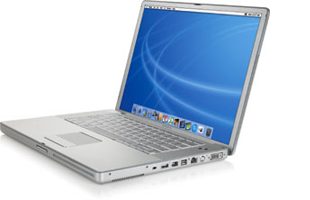
Showing posts with label powerbook. Show all posts

Friday, December 25, 2009

New Airport Extreme Crashes Wireless Tiger Clients

I've spent most of Christmas Day trying to figure a way out of this mess. I even downgraded my old Powerbook G4 to Panther, only to discover that it--initially--had no support for WPA security (doing the normal upgrades to it now via Ethernet). Not sure why it seems that every time I buy a new piece of Apple gear, it doesn't cooperate very well with older Apple gear. I understand that time moves on (and Apple wants us to as well), but one expects things like basic wireless in a working Mac to continue working with newer Apple wireless routers. But no.

I initially thought the problem might be my new WDS setup, but that's not the case. The kernel panics persisted, whether I disengaged WDS or not.

The Airport Extreme Base Station in its current firmware incarnation (7.5) causes kernel panics on ALL wireless clients running Tiger 10.4.11. This is confirmed by multiple users on the Apple Support Boards:

My Apple Tech confirmed (early November) that there is a known problem with the new Airport Extreme Dual Band Base Station causing kernel panics on computers running Tiger (only when connecting wirelessly via an Airport card -- not when connected via Ethernet cable). Apple Engineering has been notified and has not -- as yet -- released a software update to Tiger. Based on some customers' reports, we tried disabling the Guest Network on the base station, but that didn't work for me. Has anyone figured out a work-around besides 1) the ethernet cable and 2) upgrading to Leopard?

[From Apple - Support - Discussions - Kernel Panic when Running Tiger ...]
One user managed to get Apple to send him a Leopard install to address the issue:

Here's my experience. Ran two iMacs with Tiger 10.4.11 and a new iMac Intel Core Duo with an Airport 801.g Extreme. Alls well. I upgraded to an Airport 801.n and all **** broke loose with Unresolved Kernel Traps (UKT) on both Tiger machines. I managed to obtain Leopard from Apple and will upgrade each Tiger machine a couple of days apart to be sure I don't have any more UKTs. Then I will reinstall the Airport 801.n and see what happens. If I can believe what Apple Support has told me my problems should be solved. I should know by end of this coming weekend.

[From Apple - Support - Discussions - Kernel Panic when Running Tiger ...]

So I put in a service call to Apple and spoke with a rep today; the rep didn't offer a Leopard install like they did for the other user, and they didn't even admit that there was a known problem:

No dice. Just got off the phone with Apple and their solution for me was to go into the Apple Store. He said it was a computer issue...not the AEBS. I even brought up this thread (i.e., Tiger incompatible with new AEBS) and that other users said that Apple had acknowledged this problem. He said he had not heard that and that it was my computer?

Keep in mind that I told him that both my G4 machines are running Tiger (Powerbook and Mac Mini) and both are kernel panicking with the new AEBS.

So, I obviously didn't get the good support that you received...

[From Apple - Support - Discussions - Kernel Panic when Running Tiger ...]

I've basically tried everything (including doing Leopard installs using Target Disk mode), and nothing is really working (the G4 versus Intel architecture creates problems--i.e., the GUID versus APM). I either must get a Leopard Retail disc from Apple or wait for them to officially acknowledge the problem and issue a firmware update. Arggggghhh! My Powerbook is now running 10.3.9 (Panther) after the updates and is doing fine on the new AEBS, so this PROVES it's Tiger that is not compatible with the new Airport Extreme Base Station (802.11n). The Mac Mini is dead in the water at the moment in terms of wireless connectivity (I have the Airport turned off...and no more panics). I have ordered some cheap Cat-5 cable, which should be here soon and keep the Mini running until the firmware update shows up. Apple, your users really shouldn't have to go through such nonsense.

FOLLOW-UP on 26 DEC 2009:

As a follow-up, my issues were solved by installing Leopard on my G4 machines, which was not easy. See my post below on the Apple Discussions thread:

I can confirm now--as have others here--that it is definitely the Airport Extreme Base Station (802.11n) that is causing the kernel panic problem with Tiger. It will also not cooperate with Panther 10.3.9, IF you install the AirPort Extreme Driver Update 2005-001 update:

http://support.apple.com/kb/DL426

I downgraded my Powerbook G4 Aluminum 15" to Panther and had it working well at 10.3.9 until I installed the above driver update, so this driver (or some code within it) is the culprit; obviously, it hung around in Tiger but changed in Leopard and Snow Leopard (hint, hint, Apple).

I have now managed to update my old G4s (through much effort) to Leopard and both are cooperating nicely now with the Airport Extreme Base Station. I suspect Apple will update the driver eventually, but if you're having issues...go back to Panther (w/o the aforementioned driver update) or upgrade to Leopard if your system will install/run it.

FWIW, I installed Leopard on my old G4 Mac Mini (with 512 MB RAM) using Target Disc mode from the Powerbook running the install DVD. Leopard would not install any other way on that machine. Good luck all!

[From Apple - Support - Discussions - Re: Kernel Panic when Running Tiger ...]

Wednesday, November 05, 2008

Powerbook Memory Slot Suit

It has finally happened! Please see my previous posts here and here on this exact problem and Apple's lack of assistance. I'm jumping onboard this lawsuit as soon as it gets class-action status. Why doesn't Apple just fix crap that they screw up? Seems like it would be a lot cheaper.

Apple faces lawsuit over defective PowerBooks | Macworld:

Editor’s Note: This story is excerpted from Computerworld. For more Mac coverage, visit Computerworld’s Macintosh Knowledge Center.

A New York man has sued Apple in federal court over flaws in the PowerBook G4 and has asked the judge to grant the case class-action status.

In a lawsuit filed last week in federal court in San Jose, Calif.,, Giorgio Gomelsky accused Apple of refusing to repair his PowerBook G4 notebook, which he said has a defective memory slot that has prevented him from adding more memory to speed up the system.

Apple’s refusal, Gomelsky charged, was particularly galling because the company had previously acknowledged problems with PowerBook G4 memory slots and had set up a free-of-charge repair program for a limited number of systems.


Sunday, June 01, 2008

Apple censors can't stop me

PowerbookConcerning my recent post on the Powerbook G4 lower RAM slot failure issue, I made a post on Apple Discussions that was promptly taken down. So I’ll just post the email I received from the gracious Apple Host (along with my original post) here for all to see:

Apple removed your post on Apple Discussions, titled “Re: logic board died after being replaced 2 years ago,” because it contained the following:

* Discussion of Apple Policies, Procedures or Decisions
* Polls or Petitions
* Non-constructive rants or complaints

We are including a copy of your post at the end of this email for your reference.

Our terms of use, which include helpful information about using Apple Discussions, is located here: http://discussions.apple.com/help.jspa We encourage you to continue using the Apple Discussions while abiding by our terms of use.

Kind regards,

Apple Discussions staff

++++++++++

A copy of your message for reference:


My Powerbook G4 1.5 GHz 15” (1 GB RAM) also recently developed the lower RAM slot failure. Our PB had slowed to a crawl, so I popped open System Profiler and noticed that half my RAM was missing (lower slot showed EMPTY). I thought it was the memory, so I bought another stick and tried it in both slots—the lower slot continued to show EMPTY, while the upper slot was OK.

My problem is that my PB’s serial number DOES NOT FALL within the arbitrary range selected by Apple for the Repair Extension Program. I spent an hour yesterday on the phone with Apple Tech Support, and they want me to take it to the Apple Store here in San Antonio to be checked out. Of course, they will discover (like me) that the lower slot is bad, and then they will tell me what the person at Apple told me on the phone—I’ll HAVE TO PAY TO FIX IT BECAUSE IT’S NOT IN THE SERIAL NUMBER RANGE SELECTED BY APPLE FOR THE REPAIR EXTENSION PROGRAM

I have found many examples via Google of Apple customers in my exact predicament—lower slot failure with Powerbooks outside of that serial number range. Seems to me that Apple has a bigger problem than they want to admit, so let the class actions begin. One way or another, Apple will have to own up to this considerable problem.

Recommend others searching here and having my problem snoop around via Google and sign the petition and the class action that’s being started.

Powerbook lower RAM slot failure

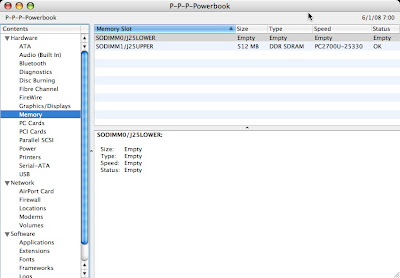
PowerbookApple doesn't do it often, but when they piss off their customers--they REALLY piss off their customers. We recently noticed that our Powerbook G4 15" 1.5 GHz (purchased mid-2004) was slowing down. Being dense, it took me a while to open System Profiler and notice that half of our memory was gone (from the original 1 GB down to 512 MB). The memory in the lower slot was listed as "EMPTY."

My problem is that my PB's serial number DOES NOT FALL within the arbitrary range selected by Apple for the PowerBook G4 (15-inch 1.67/1.5GHz) Memory Slot Repair Extension Program. I spent an hour yesterday on the phone with Apple Tech Support, and they want me to take it to the Apple Store here in San Antonio to be checked out. Of course, they will discover (like I did) that the lower slot is bad, and then they will tell me what the person at Apple told me on the phone:

I'LL HAVE TO PAY TO FIX IT BECAUSE IT'S NOT IN THE SERIAL NUMBER RANGE SELECTED BY APPLE FOR THE REPAIR EXTENSION PROGRAM.

And I'm not the only one. Others with Powerbooks outside of Apple's arbitrarily chosen serial number range are also plagued with this problem:

RAM slot not working after upgrading to Leopard | MacRumors Forums

I was not aware of this problem, however my serial number is outside the range of "affected" machines. It does exactly describe my problem, though. And perhaps it has nothing to do with Leopard but like I said, it happened just after I installed it. I suppose I can live on 1GB of RAM, but 1.5 would definitely help.

Thanks for your replies,
Matt

PowerBook G4: Memory Problems | Macintouch

I have a 1.33 Ghz 15" Powerbook and the lower memory slot has died in my machine - twice. Both times Apple (under Applecare) replaced the motherboard, but the problem clearly predates the newer machines, and I'm a little anxious about what happens once my expensive Applecare coverage lapses. I suspect that Apple is being disingenuous about the extent of this issue.

Apple - Support - Discussions - logic board died after being replaced 2 years ago:

My PB's logic board is broken again. It was fixed under warranty two years ago.

I was having problems with it, it was running extremely slow and the battery no longer charges. Turns out I am missing half of my RAM. The lower slot no longer sees the RAM, which is what happened two years ago when my logic board died.

My computer is not under warranty anymore (no AppleCare). What should I do? Has this happened to you?

This is just a small sampling of what's out there. Other key links to check out regarding this considerable problem:

Lower Memory Missing; All Forces

Allegations of 15" PowerBook RAM Slot Defect

G4 Powerbook Aluminum RAM slot repair

(if you're not willing to wait for this to play out legally - $250 repair)

Mac OS X updates disable or damage PowerBooks?

PowerBook Logic Board Failure

Powerbook Ram Slot Failure

PowerBook - PB G4 Memory Slot Failure

My cheaper, temporary solution will be to buy a 1 GB stick (yet more expense to me--thanks Apple) to insert in the one good slot; at least I'll have my original amount of RAM again. If you're one of those who had more than 1 GB RAM, you'll have to wait or pay for the repair above--don't send it to Apple (too expensive and too little warranty).

There's a petition out there to sign (4701 signatures as of June 2008), and you can also sign up here for a potential class action lawsuit. Don't get stuck paying for something that's not your fault!

Shame Apple! Look at me--devoted Apple fanboy since 1986--having to beg Apple to treat me like a loyal customer. Shame, shame, shame!

Wednesday, January 11, 2006

My Gear

It’s nice to talk about what comprises your Apple setup. Here’s what I have:

Hardware Overview (G4 AGP):

Machine Model: Power Mac G4 (AGP graphics) CPU Type: PowerPC G4 (3.3) Number Of CPUs: 2 CPU Speed: 1.2 GHz L2 Cache (per CPU): 256 KB L3 Cache (per CPU): 2 MB Memory: 1.19 GB Bus Speed: 100 MHz Boot ROM Version: 4.2.8f1

Capacity: 9.57 GB Model: QUANTUM FIREBALLP LM10.2

Capacity: 114.5 GB Model: Maxtor 6Y120P0

Capacity: 233.76 GB Manufacturer: ATA Model: Maxtor 6Y250P0

Capacity: 57.27 GB Manufacturer: ATA Model: IC35L060AVV207-0

Capacity: 4.11 GB Manufacturer: PIONEER Model: PIONEER DVD-RW DVR-107D Revision: 1.18 Drive Type: CD-RW/DVD-RW

ACARD,6280M (to allow running the huge 233 GB Maxtor): Name: ACARD,6280M Type: scsi Bus: PCI

ATY,Rage128Pro (driving a MAG Innovision monitor): Type: display Bus: AGP Slot: SLOT-A VRAM (Total): 16 MB

ATY,Rage128 (driving a ViewSonic A75s monitor): Type: display Bus: PCI Slot: SLOT-D VRAM (Total): 16 MB

That’s the studio Macintosh. Our network consists of a Netgear router and an Airport Express. The network has a Mac Mini and Powerbook Aluminum 15. Finally, a nice 3G 20GB iPod to top it off!! Other studio stuff can be seen here.