Showing posts with label G4. Show all posts

Sunday, June 01, 2008

Apple censors can't stop me

PowerbookConcerning my recent post on the Powerbook G4 lower RAM slot failure issue, I made a post on Apple Discussions that was promptly taken down. So I’ll just post the email I received from the gracious Apple Host (along with my original post) here for all to see:

Apple removed your post on Apple Discussions, titled “Re: logic board died after being replaced 2 years ago,” because it contained the following:

* Discussion of Apple Policies, Procedures or Decisions
* Polls or Petitions
* Non-constructive rants or complaints

We are including a copy of your post at the end of this email for your reference.

Our terms of use, which include helpful information about using Apple Discussions, is located here: http://discussions.apple.com/help.jspa We encourage you to continue using the Apple Discussions while abiding by our terms of use.

Kind regards,

Apple Discussions staff

++++++++++

A copy of your message for reference:


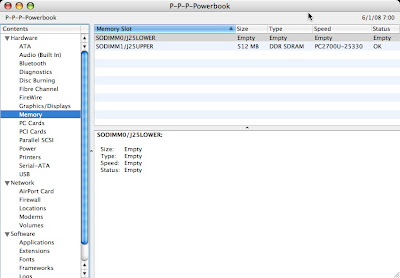
My Powerbook G4 1.5 GHz 15” (1 GB RAM) also recently developed the lower RAM slot failure. Our PB had slowed to a crawl, so I popped open System Profiler and noticed that half my RAM was missing (lower slot showed EMPTY). I thought it was the memory, so I bought another stick and tried it in both slots—the lower slot continued to show EMPTY, while the upper slot was OK.

My problem is that my PB’s serial number DOES NOT FALL within the arbitrary range selected by Apple for the Repair Extension Program. I spent an hour yesterday on the phone with Apple Tech Support, and they want me to take it to the Apple Store here in San Antonio to be checked out. Of course, they will discover (like me) that the lower slot is bad, and then they will tell me what the person at Apple told me on the phone—I’ll HAVE TO PAY TO FIX IT BECAUSE IT’S NOT IN THE SERIAL NUMBER RANGE SELECTED BY APPLE FOR THE REPAIR EXTENSION PROGRAM

I have found many examples via Google of Apple customers in my exact predicament—lower slot failure with Powerbooks outside of that serial number range. Seems to me that Apple has a bigger problem than they want to admit, so let the class actions begin. One way or another, Apple will have to own up to this considerable problem.

Recommend others searching here and having my problem snoop around via Google and sign the petition and the class action that’s being started.

Powerbook lower RAM slot failure

PowerbookApple doesn't do it often, but when they piss off their customers--they REALLY piss off their customers. We recently noticed that our Powerbook G4 15" 1.5 GHz (purchased mid-2004) was slowing down. Being dense, it took me a while to open System Profiler and notice that half of our memory was gone (from the original 1 GB down to 512 MB). The memory in the lower slot was listed as "EMPTY."

My problem is that my PB's serial number DOES NOT FALL within the arbitrary range selected by Apple for the PowerBook G4 (15-inch 1.67/1.5GHz) Memory Slot Repair Extension Program. I spent an hour yesterday on the phone with Apple Tech Support, and they want me to take it to the Apple Store here in San Antonio to be checked out. Of course, they will discover (like I did) that the lower slot is bad, and then they will tell me what the person at Apple told me on the phone:

I'LL HAVE TO PAY TO FIX IT BECAUSE IT'S NOT IN THE SERIAL NUMBER RANGE SELECTED BY APPLE FOR THE REPAIR EXTENSION PROGRAM.

And I'm not the only one. Others with Powerbooks outside of Apple's arbitrarily chosen serial number range are also plagued with this problem:

RAM slot not working after upgrading to Leopard | MacRumors Forums

I was not aware of this problem, however my serial number is outside the range of "affected" machines. It does exactly describe my problem, though. And perhaps it has nothing to do with Leopard but like I said, it happened just after I installed it. I suppose I can live on 1GB of RAM, but 1.5 would definitely help.

Thanks for your replies,
Matt

PowerBook G4: Memory Problems | Macintouch

I have a 1.33 Ghz 15" Powerbook and the lower memory slot has died in my machine - twice. Both times Apple (under Applecare) replaced the motherboard, but the problem clearly predates the newer machines, and I'm a little anxious about what happens once my expensive Applecare coverage lapses. I suspect that Apple is being disingenuous about the extent of this issue.

Apple - Support - Discussions - logic board died after being replaced 2 years ago:

My PB's logic board is broken again. It was fixed under warranty two years ago.

I was having problems with it, it was running extremely slow and the battery no longer charges. Turns out I am missing half of my RAM. The lower slot no longer sees the RAM, which is what happened two years ago when my logic board died.

My computer is not under warranty anymore (no AppleCare). What should I do? Has this happened to you?

This is just a small sampling of what's out there. Other key links to check out regarding this considerable problem:

Lower Memory Missing; All Forces

Allegations of 15" PowerBook RAM Slot Defect

G4 Powerbook Aluminum RAM slot repair

(if you're not willing to wait for this to play out legally - $250 repair)

Mac OS X updates disable or damage PowerBooks?

PowerBook Logic Board Failure

Powerbook Ram Slot Failure

PowerBook - PB G4 Memory Slot Failure

My cheaper, temporary solution will be to buy a 1 GB stick (yet more expense to me--thanks Apple) to insert in the one good slot; at least I'll have my original amount of RAM again. If you're one of those who had more than 1 GB RAM, you'll have to wait or pay for the repair above--don't send it to Apple (too expensive and too little warranty).

There's a petition out there to sign (4701 signatures as of June 2008), and you can also sign up here for a potential class action lawsuit. Don't get stuck paying for something that's not your fault!

Shame Apple! Look at me--devoted Apple fanboy since 1986--having to beg Apple to treat me like a loyal customer. Shame, shame, shame!

Thursday, July 27, 2006

PMU problems? Hope not.

I've started seeing this message:

Jul 27 17:45:09 localhost kernel[0]: ApplePMU::PMU forced 
shutdown, cause = -122

I'd like to think it's a faux pas, but I think I'm reaching the physical and technical limits of what my old G4 can do. Tiger will be the last OS installment on this machine until I can replace it.

I've added a new video card (that powers 2 monitors), several hard drives, an firewire audio interface, a USB 2.0 card, and a processor upgrade. So I'm not surprised to see all these problems cropping up.

I'm also having a lot more kernel panics, freezes, and various application crashes. Not sure what to do next.

Saturday, March 11, 2006

Current system.log error messages

What follows are recurring error messages I’m seeing in the system.log, though my current 10.4.5 system seems to be running fine. I’m hoping to address each of these issues over time.

Here are some issues I’m seeing at shutdown:

Mar 10 21:38:28 Studio-Mac-G4 loginwindow[84]: sendQuitEventToApp (LAServer): AESendMessage returned error -609
Mar 10 21:38:31 Studio-Mac-G4 SystemStarter[2988]: authentication service (3008) did not complete successfully
Mar 10 21:38:31 Studio-Mac-G4 kernel[0]: at_obdev_KUC: sf_attach denied! already terminatingat_obdev_KUC
Mar 10 21:38:33 Studio-Mac-G4 SystemStarter[2988]: The following StartupItems failed to properly start:
Mar 10 21:38:33 Studio-Mac-G4 SystemStarter[2988]: /System/Library/StartupItems/AuthServer

Here are some issues I’m seeing at startup:

Mar 11 06:00:43 localhost kernel[0]: WARNING: ATA Drive claims FLUSH CACHE EXT feature support but does not claim Extended LBA feature support
Mar 11 06:00:44 localhost 152109056: cupsd's bootstrap server port not found

Wednesday, March 08, 2006

Acard 6280M and Tiger = BOOM!

I have solved my hanging gray Apple screen of death issue referenced earlier many times on this blog (most recently here - follow the trail yourself back to Jan 9, 2006 when I tried to upgrade from Panther to Tiger 10.4.4 on my relatively old, but heavily upgraded, G4 AGP.

In my last post, I had discovered on the Apple discussion boards information about the Acard PCI Adapter interfering with versions of Tiger after 10.4.2. I figured this was likely my problem as well, as I have that very PCI card and was attempting to boot Tiger off of a drive connected to that Acard adapter.

It so happened that I had a fairly large 120 GB drive still attached to the main ATA bus on the system, so I duplicated my Tiger partition over to that drive. I’ve been cruising along fine since in Tiger 10.4.5. I also emailed Acard the following regarding this issue:

Dear Acard,

I have recently upgraded from Panther to Tiger (10.4.5) and may be having issues with my Acard 6280M. I have loaded the most recent drivers, but the problem still remains.

If I do any system maintenance (cache deletion) or add any new kernel extension, I will get stuck at the Apple gray startup screen. I have to do a safe-boot and then delete the following folder to be able to boot again:

/System/Library/Cache/com.apple.kernelcache/

I perused the file inside that directory and found a line referencing the 6280M. Are there any issues with the current driver and Tiger 10.4.5?

Thank you...

Shane Hendricks

Acard hasn’t yet responded and they may never respond; the current broken driver is version 1.5.7. This driver should work fine with 10.4.2 and below. They did answer some folks on the Apple discussion regarding this topic, which you can read for yourself. They basically passed the buck to Apple, which is bogus. It’s Acard’s responsibility (as a peripheral maker) to support Apple, not the other way around damn it. In another answer, they recommended doing a complete new reinstall and AVOIDING MIGRATING OR UPGRADING from Panther, which is crap for those of us with a nice running Panther system.

Anyway, this problem is solved for me, and my system seems to be running much better under Tiger. Good luck to others with this problem.

Sunday, March 05, 2006

More on SystemStarter and gray Apple screen

The plot thickens. Reference, of course, my previous posts on this subject here.

I had narrowed the culprit down specifically to /System/Library/Caches/, which seems to somehow become corrupt after some major system maintenance or modification (i.e., install of a new kernel extension or cache clean up) on my old G4 AGP (Sawtooth).

Some others on the Apple forums had suggested it could possibly be due to my Acard 6280M IDE PCI adapter, which I MAY have ruled out by updating to the latest driver (version 1.5.7.); I’m not 100% sure. I did have some troubles updating to the new Acard driver, but I eventually got it working as well as the previous version of the Acard driver I was using.

However, after reinstalling (once again) Tiger 10.4.5 from the backup I had made and migrating (again, avoiding the root files and folders--which I no longer believe is related to the problem), I installed Applejack and proceeded to clean all the caches in single-user mode to test for problem reproducibility. The system rebooted fine after the Applejack session, but I immediately rebooted again from the Finder and experienced the hang at the gray Apple screen.

Since I had narrowed the problem to /System/Library/Caches/, I decided to go through the contents systematically to find the culprit file or folder. As Murphy’s Law would have it, the very last folder I deleted (after many reboots, gray screens, and safe boots to delete files) was this folder:

/System/Library/Caches/com.apple.kernelcaches/

After deleting this folder, the system booted normally, so I may need to delete this folder after every kernel extension install or system maintenance that involves cache cleaning.

What fun! This obviously MUST be related to my hardware setup in some way, but I don’t know which part for the life of me (maybe it is the Acard, but I can’t understand why). I do have these system.log messages (the first of which I always had in Panther but never had any real issues booting):

Mar 5 09:51:04 localhost kernel[0]: WARNING: ATA Drive claims FLUSH CACHE EXT feature support but does not claim Extended LBA feature support

The above message obviously directly involved the Acard adapter.

Mar 5 09:51:04 localhost kernel[0]: Extension "com.apple.driver.PioneerSuperDrive" has no kernel dependency

The next message listed above is a new one for me. No clue...

So there’s obviously some issue with hardware, because my Mac Mini doesn’t behave this way on Tiger (and obviously for most of the Apple world). My old AGP has been so heavily upgraded that it may no longer be capable of running newer OSs (likely issues with either the Acard or my Giga Designs Dual Processor upgrade card).

Anyway, at least I’ve narrowed it down some to a kernel issue with some part of the hardware.

Friday, March 03, 2006

SystemStarter woes continue...

Nope...problem not gone.

Reference my previous posts here and here about this issue I’ve faced upgrading my old G4 AGP to Tiger and getting the weird, unpredictable, hanging gray-Apple-screen-of-frozen-death, which I’ve traced to SystemStarter in the console.

I’ve narrowed the culprit files down to something in the /System/Library/Cache/, as today I decided to delete recommended items stepwise in Safe Boot until I could boot normally again.

First, I tried deleting a few things in /Library/Cache that I thought might be the culprit, going simply by the date of modification/crreation (i.e., today). No help. So then I tried getting rid of Extensions.kextcache alone, but I still faced the screen-of-death.

So finally, I just deleted the entire contents of /System/Library/Cache, and this seems to be the cause (or something in here).

As far as what’s causing this: I’m not sure. I had a crash shortly before this happened and I ran Applejack. Reboot was fine, but a subsequent test restart was not.

BTW, here’s a great site for troubleshooting startup: http://www.thexlab.com/faqs/startupitems.html

Searching the Apple Discussion boards led me to this thread, which might be related to my problems (i.e. the Acard 6280M IDE PCI controller).

To be continued I’m sure...?

Wednesday, January 11, 2006

My Gear

It’s nice to talk about what comprises your Apple setup. Here’s what I have:

Hardware Overview (G4 AGP):

Machine Model: Power Mac G4 (AGP graphics) CPU Type: PowerPC G4 (3.3) Number Of CPUs: 2 CPU Speed: 1.2 GHz L2 Cache (per CPU): 256 KB L3 Cache (per CPU): 2 MB Memory: 1.19 GB Bus Speed: 100 MHz Boot ROM Version: 4.2.8f1

Capacity: 9.57 GB Model: QUANTUM FIREBALLP LM10.2

Capacity: 114.5 GB Model: Maxtor 6Y120P0

Capacity: 233.76 GB Manufacturer: ATA Model: Maxtor 6Y250P0

Capacity: 57.27 GB Manufacturer: ATA Model: IC35L060AVV207-0

Capacity: 4.11 GB Manufacturer: PIONEER Model: PIONEER DVD-RW DVR-107D Revision: 1.18 Drive Type: CD-RW/DVD-RW

ACARD,6280M (to allow running the huge 233 GB Maxtor): Name: ACARD,6280M Type: scsi Bus: PCI

ATY,Rage128Pro (driving a MAG Innovision monitor): Type: display Bus: AGP Slot: SLOT-A VRAM (Total): 16 MB

ATY,Rage128 (driving a ViewSonic A75s monitor): Type: display Bus: PCI Slot: SLOT-D VRAM (Total): 16 MB

That’s the studio Macintosh. Our network consists of a Netgear router and an Airport Express. The network has a Mac Mini and Powerbook Aluminum 15. Finally, a nice 3G 20GB iPod to top it off!! Other studio stuff can be seen here.

Monday, January 09, 2006

Upgrading from Panther to Tiger 10.4.3

What a pain in the patootie! My old, trusty G4 AGP 400, which has been heavily updated and modified into a dual G4 1.2 GHz Panther beast, gave me fits when I decided to load Tiger and then update it to 10.4.3. The problem: hanging at the gray Apple screen during startup without any progress indicator (the spinning wheel). I spent the better part of three days troubleshooting this nightmare, to include two separate clean installs and migrations. I discovered lots of folks were having this issue on G4s after the 10.4.3 update around the net, but no one had any solutions (other than using another Mac in target mode to install the 10.4.3 combo updater). There had to be another way.

So, I used a safe boot (⇧ during startup) to drop into safe mode, which would work every time. Single-user mode was a no go (⌘-S); the Mac stubbornly ignored the snag. I perused the Console and kept seeing this:

Jan 9 12:37:23 Studio-Mac SystemStarter[800]: authentication service (815) did not complete successfully
Jan 9 12:37:25 Studio-Mac SystemStarter[800]: The following StartupItems failed to properly start:
Jan 9 12:37:25 Studio-Mac SystemStarter[800]:
/System/Library/StartupItems/AuthServer

After much troubleshooting, I found that I could reboot normally once if I installed something on the machine that modified the extensions. Subsequent reboots would hang, however. The log entries above may or may not have indicated the ultimate problem. I’ll have to watch the system.log to see if they go away. After digging around in the Apple forums and other places, I found a solution for my nettlesome situation.

While in safe mode, I deleted the following files (* means delete directory contents):

/Library/Caches/*
/System/Library/Caches/*
/System/Extensions.kextcache

After rebooting, the problem went away, even for subsequent reboots. I’ll monitor and see if installing new kernel extensions requires repeating the deletion sequence. So far, all is good for now.